A customer message or case, plus the account and evidence needed to understand what the customer is asking.
CUSTOMER OPERATIONS
Customer Resolution System
Helps a support team move a customer case from request to resolution without losing the supporting information, owner, deadlines, or recovery path.
WORKING SYSTEMTESTED END TO END
I built CRS to take a customer request, turn it into a controlled case, check the supporting information, route higher-risk decisions to the right person, send the response, and keep follow-up and recovery visible until the case is closed.
CURRENT EVIDENCE
Designed: complete. Built: complete. Tested: complete. Delivered: not yet complete. Measured: not yet complete
I designed, built, and tested the reference implementation across intake, triage, evidence, response, human and specialist review, case deadlines, controlled Gmail delivery, real reply correlation, recovery, release blocking, and restore.
Claim boundary: This proves the reference implementation and controlled Gmail boundary were tested. It does not prove live client support performance, production scale, production SLA results, ticket deflection, CSAT improvement, cost savings, or ROI.
EXECUTIVE SNAPSHOT
A controlled system for moving a customer request from intake to resolution.
CRS is for support operations where a request may need evidence, a reply, a specialist, a deadline, follow-up, or recovery before the case can safely close.
CRS checks the request, evidence, risk, owner, deadlines, and next action before moving the case forward.
A controlled reply, human or specialist review, follow-up, or closure—with the case history and recovery path still visible.
WHEN YOU WOULD USE IT
When customer requests need more control than a shared inbox or AI reply can provide.
WHAT CRS DOES
It keeps the case, evidence, decision, response, and follow-up connected.
Validate the request, prevent duplicates, and connect it to the right customer and case record.
Understand the request, find what supports the answer, and decide whether automation is allowed.
Prepare a supported reply or send the case to the right person or specialist.
Keep deadlines, follow-up, resolution, reopening, and recovery visible until the case is done.
THE OPERATING PROBLEM
The hard part is knowing when the system should answer at all.
Customer support becomes risky when the system cannot tell whether it has the right case, enough evidence, the authority to act, or a safe recovery path when something fails.
I designed CRS to make those decisions explicit before automation touches the customer.
Why this matters
A clear answer can still be wrong.
The system needs to know what the evidence supports, who owns the next decision, and what happens if delivery or follow-up fails.
MY ROLE
I designed the rules that decide what happens next.
I defined how a request becomes a case, where AI may help, what evidence is required, when a person must take over, how deadlines and closure work, and how failures become visible. Then I built and tested the reference system in n8n and PostgreSQL.
HOW THE SYSTEM IS SET UP
The case only moves when the next check passes.
I split the system where responsibility changes. Intake, evidence, review, delivery, lifecycle, and recovery each fail in different ways, so they should not live in one large workflow.
Customer · case · interactions · evidence · decisions · communication · lifecycle · recovery
Reads the request and helps draft the reply. It does not decide what the business is allowed to do.
Sends controlled replies and receives customer responses. The case record stays in PostgreSQL.
EVIDENCE BEFORE RESPONSE
A confident answer is not enough. The evidence still has to support it.
CRS checks a controlled knowledge source before deciding what the response can say. Even good evidence does not automatically give the system permission to take a higher-risk action.
SUFFICIENTEnough support for the next decision.
INSUFFICIENTSome support exists, but not enough to rely on.
CONFLICTINGSources disagree, so automation stops.
NOT FOUNDThe system cannot support the answer from its evidence.
CAN MOVE TOWARD AUTOMATION Enough evidence + simple information request + low risk + reply checked against the evidence
Anything outside that narrow path goes to clarification, review, or a specialist.
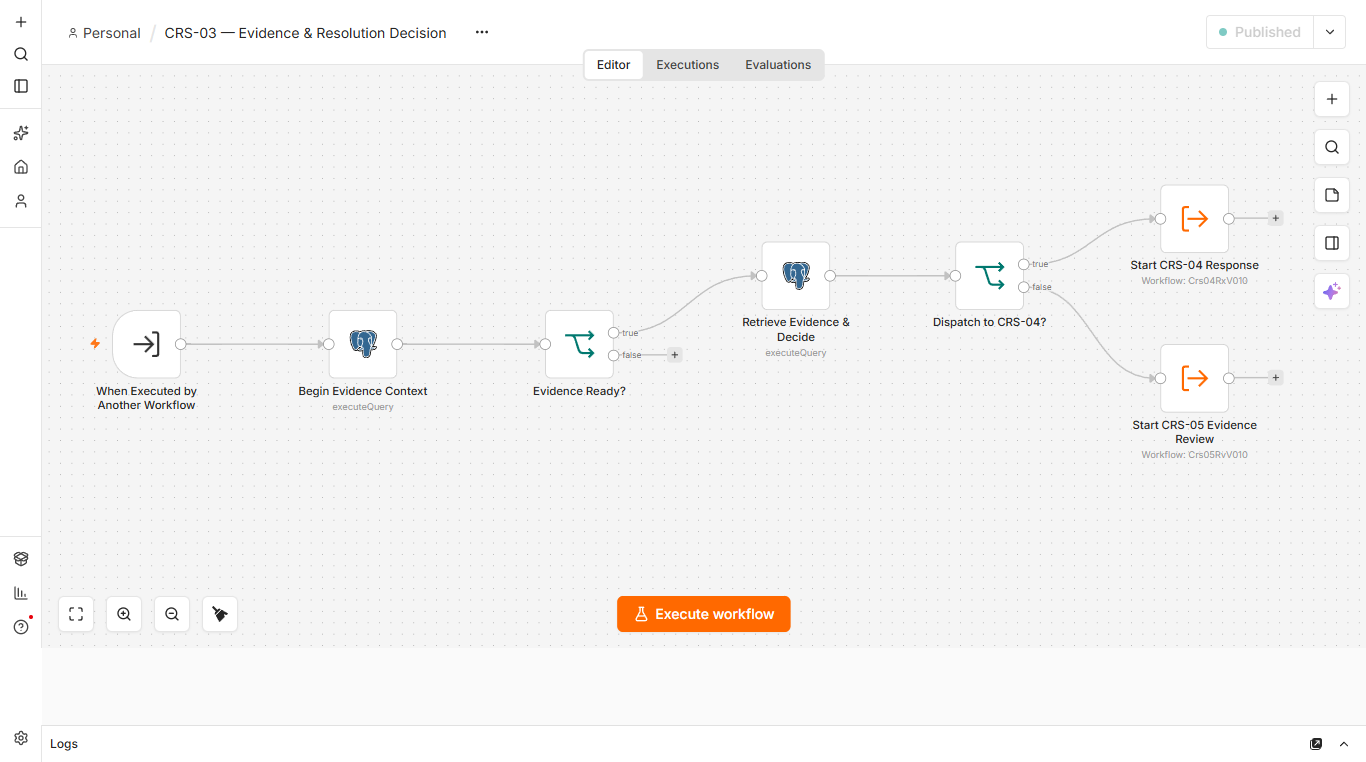
The workflow checks the evidence first. A supported case can continue toward a reply; otherwise it moves to review.
WHEN A PERSON MUST DECIDE
AI can help read the case. People and rules still decide what is allowed.
AI helps read the case
It helps classify the request, summarize it, and draft a response.
Fixed rules decide what is allowed
Priority, case state, duplicate protection, safe automation, and recovery follow fixed rules.
People make the higher-risk decisions
Refunds, exceptions, specialist judgment, and approvals stay with people.
The database keeps the record
The case does not depend on workflow memory or an email inbox.
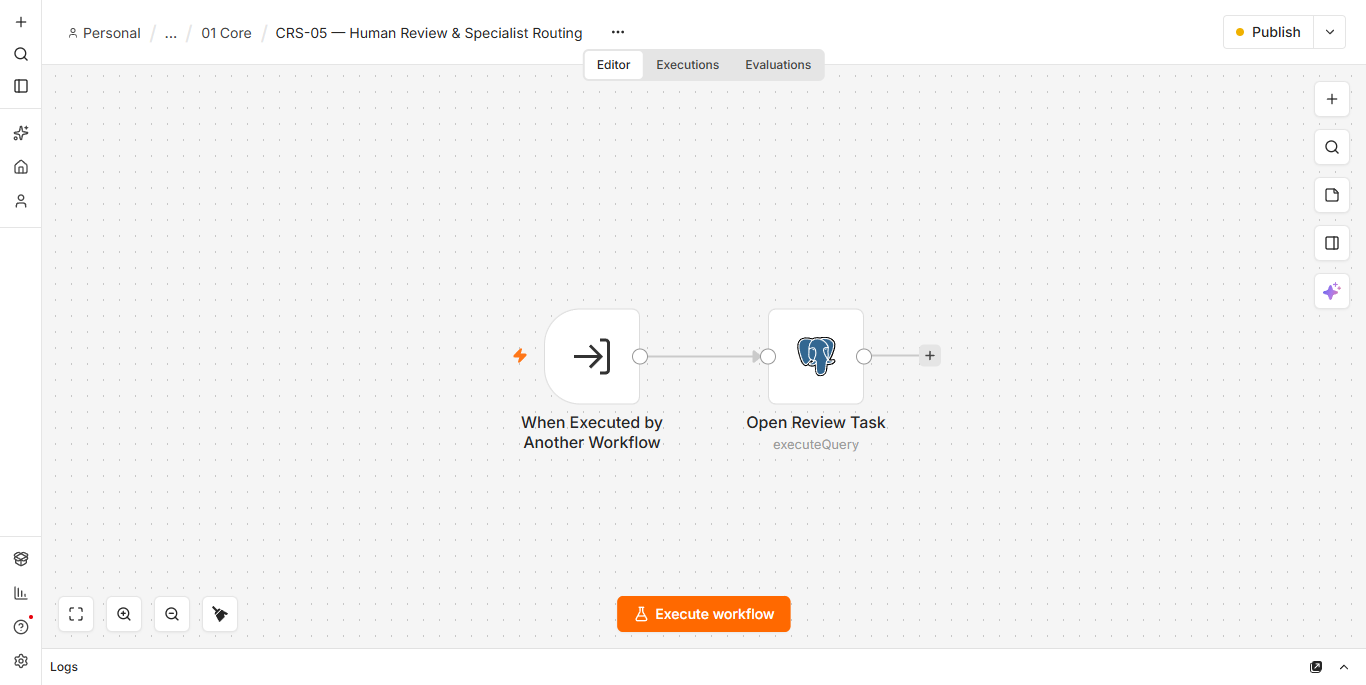
The review workflow opens persistent work for a person instead of hiding the handoff inside the automated path.
AFTER THE FIRST REPLY
The work does not end when a reply is ready.
CRS tracks response, next-action, resolution, customer-wait, and specialist deadlines. It can remind, escalate, close, and reopen while keeping each change visible in the case.
RECOVERY + RELEASE CONTROL
When something gets stuck, it becomes visible work.
The recovery layer looks for stuck sends, stuck workflows, overdue reviews, stalled follow-up, delivery failures, and missing audit records.
BEFORE FAULTREADY
INJECTED FAULTSBLOCKED
AFTER RECOVERYREADY
Delivery safety: if Gmail does not clearly confirm whether a message was sent, CRS does not blindly send it again. The case goes to verification or recovery.
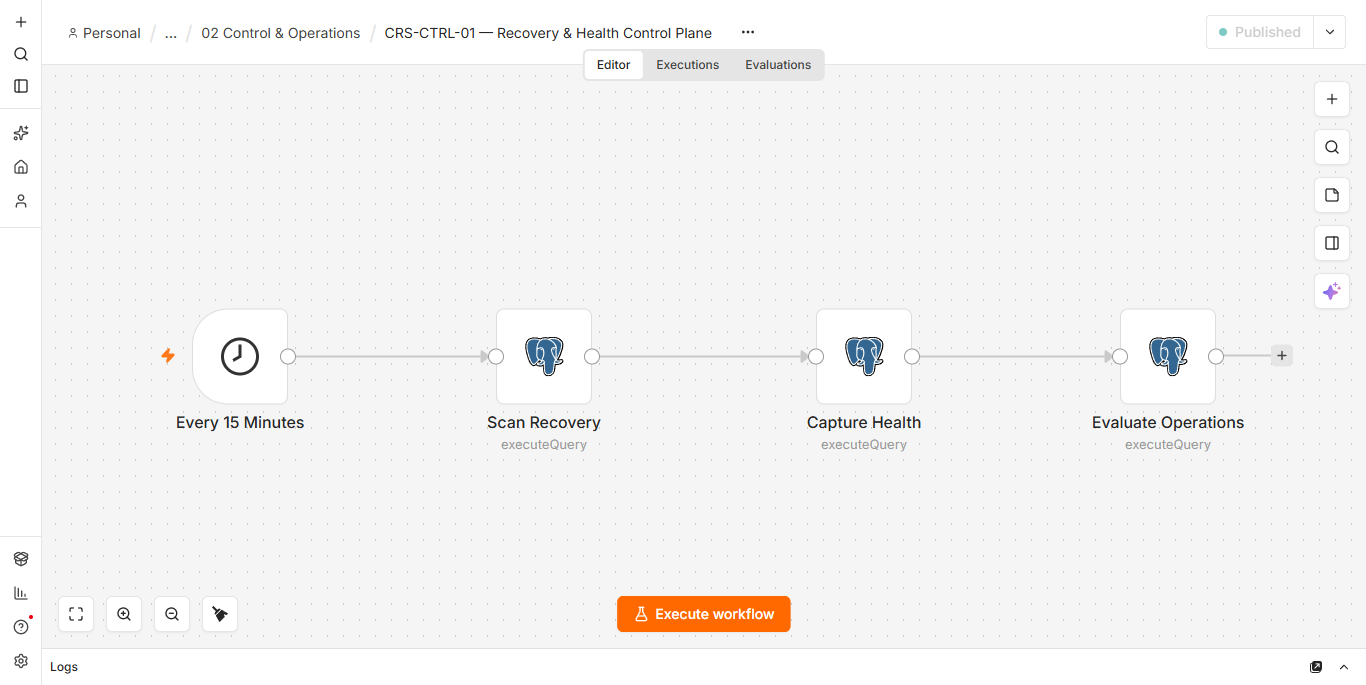
Every 15 minutes, the control workflow scans for problems, records system health, and evaluates whether operations are clear to continue.
VALIDATION
I tested the cases most likely to break the system.
Duplicate request
The same incoming event cannot start the same work twice.
Missing evidence
If the evidence is missing or disagrees, the case goes to review instead of guessing.
Unsupported draft
A reply that the evidence does not support cannot be approved.
Review ownership
The wrong role cannot take the case, and two reviewers cannot claim it at the same time.
Real Gmail test
I sent a controlled email and validated a real reply from a second mailbox in the same thread.
Duplicate reply protection
Replaying the same Gmail message does not create a second interaction.
Stuck-work test
I deliberately created stuck work and confirmed the release changed from READY to BLOCKED.
Recovery
After the problems were resolved, the release returned to READY.
ARTIFACTS TO INSPECT
You can inspect what the system decided and why.
These are sanitized representations of CRS validation fixtures. No private customer records, provider IDs, or credentials are shown.
CASE TYPEInformation request
EVIDENCESUFFICIENT
RISKLOW
NEXT STEPCAN PREPARE REPLY
REASONEvidence not found
ROLESupport reviewer
STATEOpen
CASEWaiting for human
RELEASEREADY
HEALTHHEALTHY
OPEN RECOVERY0
EVENT GAPS0
EVIDENCE BOUNDARY
I can prove the system works. I cannot claim results I have not measured.
I built and tested the reference implementation, including a real Gmail delivery and a real reply from a second mailbox. I do not claim live client support performance, production-scale SLA results, ticket deflection, CSAT gains, cost savings, or ROI.
- Working modular implementation
- Evidence and authority controls
- Real provider boundary validation
- Lifecycle and recovery behavior
- Release and restore discipline
- Production scale
- Live customer support performance
- Measured cost savings
- Ticket deflection or CSAT improvement
- Production ROI
WHAT THIS REQUIRED
What I had to get right.
Workflow Design
Separated intake, triage, information checking, response, review, case progress and recovery where their ownership or failure rules differ.
AI & Automation Implementation
Used AI where language needed interpretation, while keeping business authority in rules and human review.
Approved-Information Controls
Made the answer depend on controlled company information, not model confidence alone.
Human Review Design
Created review and specialist queues with clear role ownership and recorded decisions.
Integration Engineering
Validated provider delivery, thread identity and reply correlation against Gmail.
State & Reliability Design
Used durable database state, duplicate protection, case timers, recovery queues, and isolation for unresolved failures.
Validation & Controls
Tested failures, uncertainty, duplicates, recovery, and restore as well as successful runs.
CURRENT EVOLUTION
The next proof has to come from live operation.
The reference implementation is tested, including a real Gmail delivery and a real reply from a second mailbox. Next: adapt it to a real service operation, set the business-specific policies and delivery controls, observe live use, and only then make production-performance claims.
Need a support system where AI helps without making the risky decisions? Discuss a Project → ← View all selected work